Skip to product information
1 of 7
Fast Shipping
Fast Shipping Ships within 24–48 hours
Easy Returns
Easy Returns 30-day hassle-free return
Secure Payment
Secure Payment 100% protected checkout
Customer Support
Customer Support We are here to help

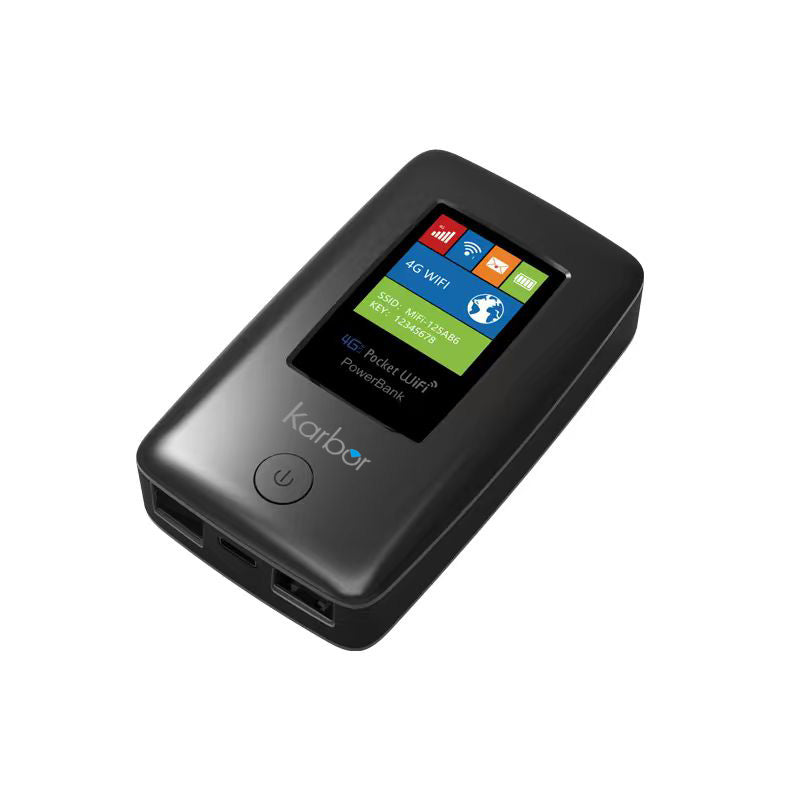
Karbor 4G MiFi Portable WiFi Router & Power Bank Combo - Unlocked Travel Hotspot

Karbor 4G MiFi Portable WiFi Router & Power Bank Combo - Unlocked Travel Hotspot

Key Features:

  • Global 4G Connectivity: Supports most international bands for seamless travel.
  • High-Speed LTE: Up to 150Mbps download and 50Mbps upload speeds.
  • Adaptive RJ45 Port: Flexible 100Mbps WAN/LAN port for wired or wireless use.
  • 2-in-1 Power Bank: Built-in 5200mAh battery to charge your mobile devices.
  • Compact & Portable: Ultra-small design for high-speed data on the go.
Size
Regular price $89.99 USD
Regular price Sale price $89.99 USD
Sale Sold out
Quantity
  • American Express
  • Apple Pay
  • Bancontact
  • Google Pay
  • Mastercard
  • PayPal
  • Shop Pay
  • Union Pay
  • Visa
View full details
Stay Connected in HD, Anywhere You Go Stay Connected in HD, Anywhere You Go

Stay Connected in HD, Anywhere You Go

No more lag or dropped calls. Karbor Portable WiFi delivers secure, enterprise-grade, high-speed internet for seamless video meetings on the go.
Flawless Video Calls, Zero Interruptions Flawless Video Calls, Zero Interruptions

Flawless Video Calls, Zero Interruptions

Get stable, high-speed internet wherever you work. Say goodbye to frozen screens and dropped audio, making every remote meeting crystal clear and smooth.

Technical Specifications

Core Chipset
ZX297520V3
WiFi Chipset: AIC8800dw
Global Network
4G LTE / WCDMA / GSM
Full Bands: B1/2/3/5/7/8/20/28/38/40/41
Data Speed
LTE CAT4
150Mbps Download / 50Mbps Upload
WiFi Technology
WiFi 6 (802.11ax)
2.4GHz High-Speed Protocol
Battery Power
6000mAh Li-on
Integrated Power Bank Function
Antenna Tech
MIMO Support
WiFi 1*1 / LTE 2*2
Client Capacity
Up to 10 Users
Stable Multi-Device Connection
Interface & Slot
Type-C / USB 2.0
Nano SIM Card Slot (4FF)
System Support
Fota / SMS / USSD
TR069/DDNS/DMZ/Port Forwarding
Design Specs
100*60*23mm
4 LED Status Indicators
Versatile Ports for Any Scenario Versatile Ports for Any Scenario

Versatile Ports for Any Scenario

Go beyond basic wireless. Equipped with RJ45 (LAN/WAN) and USB ports. Plug into a hotel wall outlet to create an instant private router, or connect directly to your laptop for a zero-latency, interference-free wired connection.
Powerful Signal, Zero Dead Zones

Powerful Signal, Zero Dead Zones

A powerful signal foundation provides high-speed internet that rivals fixed broadband. Maintain a rock-solid connection free from environmental interference, ensuring smooth international video calls and instant large file transfers
Zero learning curve. Get started in seconds. Zero learning curve. Get started in seconds.

Zero learning curve. Get started in seconds.

1. Power Up: Long press to start.
2. Scan to Link: Instant connection.
3. Go Surfing: Fast & stable browsing
Buy with Confidence. Quality Guaranteed. Backed by Reliable After-Sales Support. Buy with Confidence. Quality Guaranteed. Backed by Reliable After-Sales Support.

Buy with Confidence. Quality Guaranteed. Backed by Reliable After-Sales Support.

Let's Answer Your Questions

Why does the device says "No Service" even bought a data plan?

Please allow ​​10-30 minutes​​ for the system to activate your data plan after purchase. Your connection will update automatically.

How do I get 1GB global data free?

1. Download “Karbor WiFi" APP, create account, add device to your App account

2. Click User > Device Manage > Claim, enter your order id, including dashes and no spaces

Where do i find the WiFi password? How do i change the WiFi password?

Following locations:

​​1. On the LCD screen​​ after turn it on 2. ​​Inside the back cover​​ (remove cover)

Change WiFi password:

Download App→Create acocunt→Add device→Back to Home→Click WiFi Settings(Note:New password must be at least 8 characters)

How do I buy a data plan?

Way 1: Download App→Create acocunt→Add device→Click Shop→Buy Data Plans

Way 2: Find the code on device back cover → Scan it with phone's nature camera→Buy Data Plans

Note: Payment can be made via credit card or PAYPAL only.

How do I connect to WiFi Network? (Please Note: Internet access requires an active data plan.

Way 1: ​​Remove device back cover→Find the code inside→Scan it with phone's nature camera→Enter Password→Connect

Way 2: Download App→Create acocunt→ Add device→Connect WiFi

Way 3: Settings→WiFi →Select Hotspot WiFi Name→Enter Password→Connect